Where Delta fits
A desktop, within reach.
For assisted support, work across locations and focused collaboration. Start with an agreed task and a host who accepts the session.
01
Help at the right moment
Guide someone through a desktop task while they stay involved and approve the connection.
Work in a window or full screen, select the host monitor you need and adjust quality to the connection. Keyboard and mouse control depend on the permissions granted by the host.
02
Work across locations
Reach a desktop in another location with the host present to accept your session.
Start host mode, share the device ID and review the incoming request. Accept with the permissions needed for the task, then follow the active connection and end it from the host panel.
03
Exchange what matters
Move task files through the transfer queue and consult the file record on the host.
Browse the local and remote file lists, choose the transfer direction and follow jobs in the queue. Cancel a transfer when needed; the host’s file record shows paths and whether files were read or written.
DELTA / Inside Delta
Your desktop. A shared workspace.
Delta brings assisted remote access, conversation and file exchange together. Start with a device ID, keep the host involved and choose the tools your task needs.
All capabilities ↗01
The host stays in the picture.
Host mode shows the device’s status and connectable ID. The person at the desktop can receive the request, review it and decide whether to accept.
See the approach ↗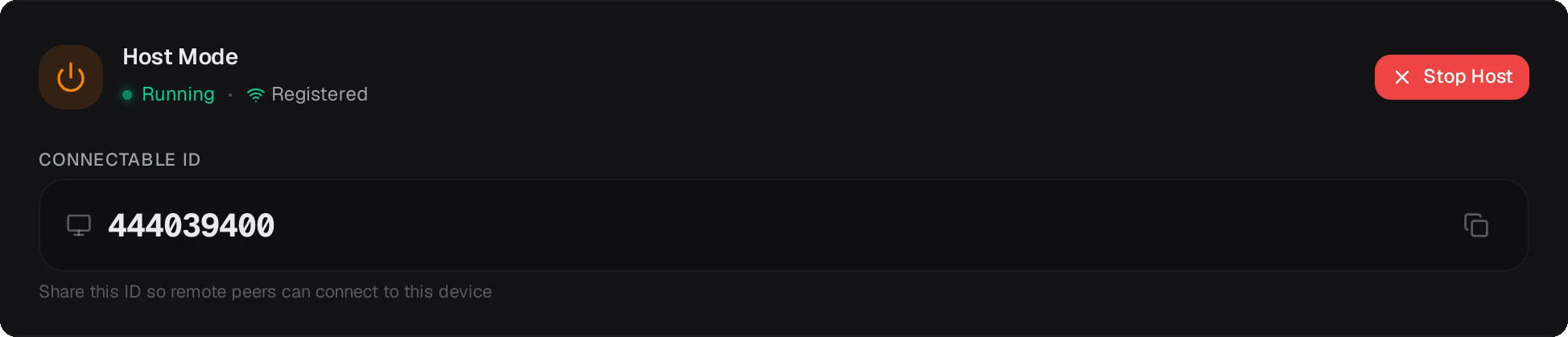
Screens from the real application. Select a view to explore it.

02
One connection. Specific permissions.
Before accepting, review who is connecting and choose keyboard, clipboard, audio, file and restart permissions. Access follows the task you agree on.
Continue exploring ↗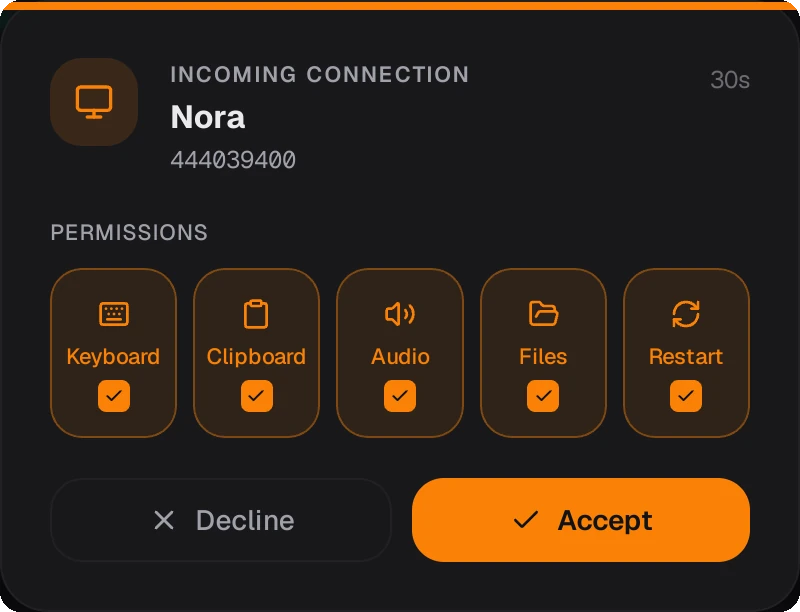
The essentials, within reach.
A remote session starts with a person who accepts it. Agree on the task, choose the permissions and keep the conversation open while you work.
All capabilities ↗