A deliberate connection
Connection with intention.
Keep the task clear and the host involved. Delta brings approval, connection permissions and practical session tools into the same workflow.
How it comes together
01
Make contact
Use the host address to request a connection to the desktop.
02
Wait for approval
The person at the host explicitly accepts the connection.
03
Choose permissions
Set the connection permissions to match the work you have agreed on.
04
Work together
Follow the screen, use chat and exchange the files the task needs.
DELTA / Inside Delta
Your desktop. A shared workspace.
Delta brings assisted remote access, conversation and file exchange together. Start with a device ID, keep the host involved and choose the tools your task needs.
All capabilities ↗01
The host stays in the picture.
Host mode shows the device’s status and connectable ID. The person at the desktop can receive the request, review it and decide whether to accept.
See the approach ↗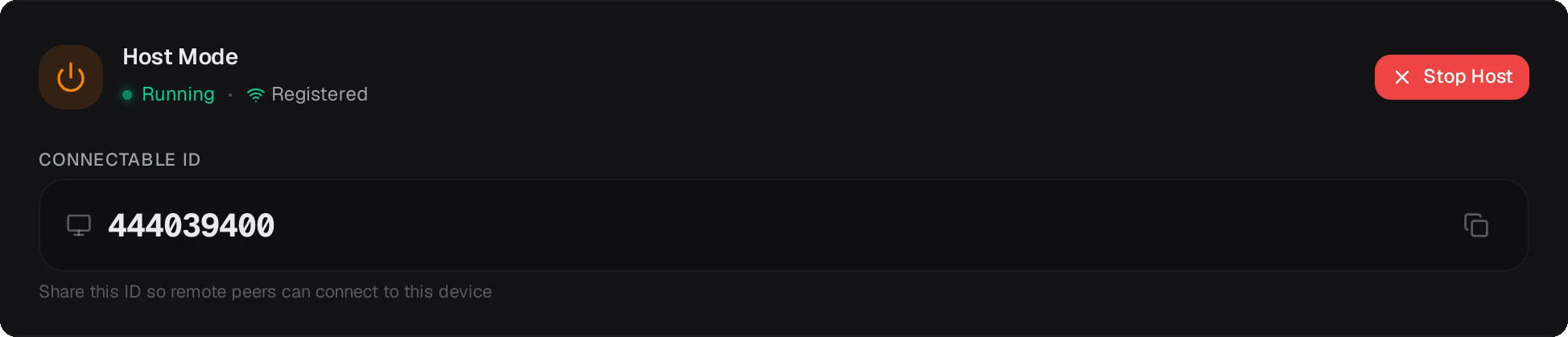
Screens from the real application. Select a view to explore it.

02
One connection. Specific permissions.
Before accepting, review who is connecting and choose keyboard, clipboard, audio, file and restart permissions. Access follows the task you agree on.
Continue exploring ↗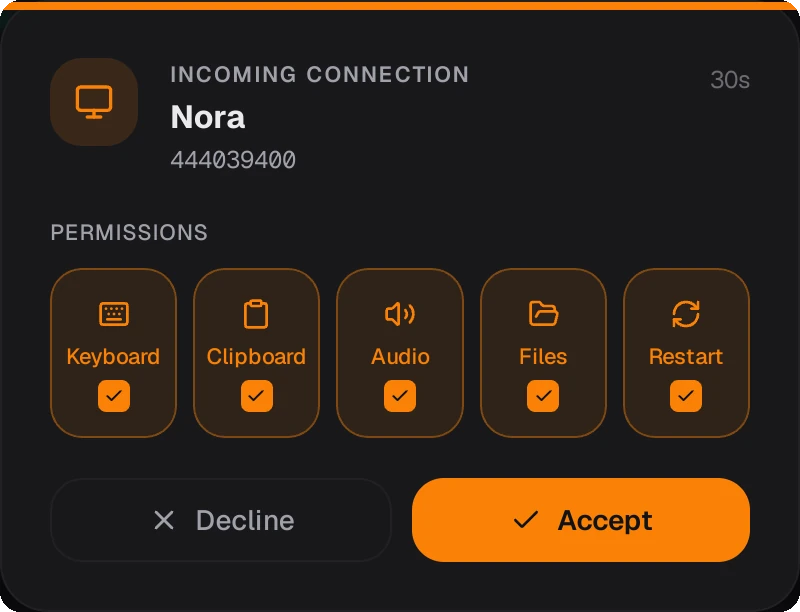
DELTA / From request to session
One task. A shared process.
Make contact
Use the host address to request a connection to the desktop.
Wait for approval
The person at the host explicitly accepts the connection.
Choose permissions
Set the connection permissions to match the work you have agreed on.